04 Requirements Engineering: The Christmas Client Challenge
December 2025 (1125 Words, 7 Minutes)
Introduction
Welcome to a hands-on exercise that brings requirements engineering to life! In this challenge, you’ll experience firsthand what happens when a client gives you vague requirements - and how proper RE techniques can help.
Team Size: 2-4 people Tools Needed: Access to an AI image generator (DALL-E, Midjourney, Stable Diffusion, or similar)
Learning Objectives
- Experience how vague requirements lead to divergent interpretations
- Practice writing testable requirements using User Stories and Acceptance Criteria
- Understand how tool constraints become requirements
- See traceability between requirements and deliverables
Your Deliverables
Each team must submit 3 artifacts for the contest:
| # | Artifact | Format | Description |
|---|---|---|---|
| 1 | Requirements Document | Markdown or Word | Your requirements with prioritization (use template below) |
| 2 | Final Prompt | Text | The exact prompt you used for the winning image |
| 3 | Final Image | Image file | Your Christmas course image |
The Scenario
You’ve been hired to create a new course image. Your client (the instructor) shows you the current image:
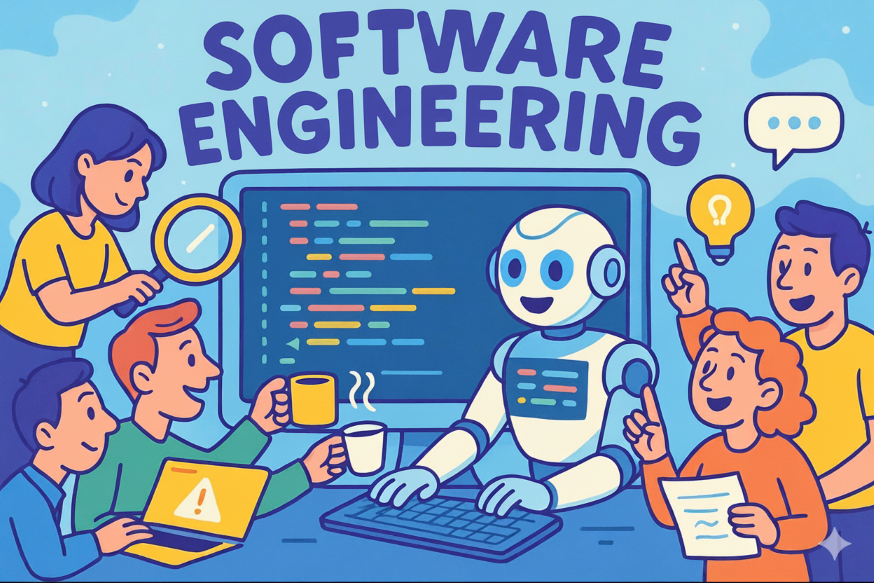
The client’s brief:
“I want a Christmas version of this. Make it awesome!”
That’s it. That’s all you get. Sound familiar?
Phase 1: The Vague Brief
Instructions
- Form teams of 2-4 people
- Look at the original image above
- Discuss with your team: What does “Christmas version” mean? What makes something “awesome”?
- Important: You cannot ask the client for clarification yet - this simulates real-world scenarios where the client isn’t available or doesn’t know what they want
Discussion Prompts
- What Christmas elements come to mind?
- Should we keep the robot? The students? The text?
- What style should it be? Realistic? Cartoon? Same as original?
- What colors represent “Christmas” to your team?
Phase 2: Requirements Workshop
Now apply what you learned in the Requirements Engineering lecture to transform the vague brief into concrete, testable requirements.
Use the template below for your Requirements Document (Artifact 1).
Requirements Document Template
Copy this template into a new markdown or Word file:
# Christmas Course Image - Requirements Document

**Team Name:** [Your team name]
**Date:** [Today's date]
**Tool Selected:** [DALL-E / Midjourney / Stable Diffusion / Other]

## User Stories

1. As a [role], I want [feature], so that [benefit].
2. As a [role], I want [feature], so that [benefit].
3. As a [role], I want [feature], so that [benefit].
[Add more as needed]

## Acceptance Criteria

For our most important requirement:
- Given [context], When [action], Then [expected result].

## Requirements with Prioritization

### Must Have (image fails without these)
- [Requirement 1]
- [Requirement 2]

### Should Have (important but not critical)
- [Requirement 3]
- [Requirement 4]

### Could Have (nice to have)
- [Requirement 5]

### Won't Have (explicitly out of scope)
- [What we decided NOT to include]

## Constraints
- **Style:** [Match original cartoon / More realistic / Other]
- **Must retain:** [Robot / Students / Text / Code on screen / Layout]
- **Color palette:** [Your chosen Christmas colors]
Example User Stories
As the course instructor, I want the robot to wear a Santa hat, so that the image immediately signals “Christmas edition” to students.
As a student, I want to see snow falling in the background, so that the winter atmosphere is clear.
Example Acceptance Criteria
Given the final image is displayed, When a viewer looks at it for 2 seconds, Then they should be able to identify at least 3 Christmas-related elements.
Tip: Good requirements pass the INVEST test - they are Independent, Negotiable, Valuable, Estimable, Small, and Testable.
Phase 3: Creation Time
Instructions
- Based on your requirements, craft a prompt for your chosen AI image generator
- Generate your Christmas course image
- You may iterate 2-3 times to refine the result
- Save your final prompt (Artifact 2) and final image (Artifact 3)
Tips for Prompting
- Reference specific requirements in your prompt
- Be explicit about style, colors, and composition
- Include “must have” elements clearly
- Note any tool limitations you encounter
Phase 4: The Contest
Submission
Submit your 3 artifacts to the instructor:
- Requirements Document (markdown or Word file)
- Final Prompt (text)
- Final Image (image file)
AI Judging
The instructor will feed all submissions to an AI judge (Claude) using standardized criteria:
Judging Criteria:
| Criterion | Weight | Description |
|---|---|---|
| Requirement Compliance | 40% | How well does the image match the team’s OWN requirements? |
| Christmas Spirit | 30% | Does it feel festive? Creative use of Christmas elements? |
| Creativity & Quality | 30% | Original interpretation, visual coherence, retained essence of original |
AI Judging Prompt (for Instructor)
Click to reveal the AI judging prompt
You are judging a Christmas image contest for a Software Engineering course.

CONTEXT:
- Students were given a vague brief: "Make a Christmas version of our course image. Make it awesome!"
- Each team derived their own requirements and created an image based on them
- The original image shows: a friendly robot teacher in the center, students with laptops around it, "SOFTWARE ENGINEERING" text, colorful cartoon style

SUBMISSION FORMAT (per team):
Each team submits 3 artifacts:
1. REQUIREMENTS DOCUMENT: Contains User Stories, Acceptance Criteria, and prioritized requirements (Must Have / Should Have / Could Have / Won't Have)
2. FINAL PROMPT: The exact prompt used to generate the winning image
3. FINAL IMAGE: The generated Christmas course image

JUDGING CRITERIA (score each 1-10):

1. REQUIREMENT COMPLIANCE (40%)
   - How well does the image match the team's OWN "Must Have" requirements?
   - Are the "Should Have" requirements addressed?
   - Does the prompt reflect the documented requirements?
   - Deduct points for requirements claimed but not visible in image

2. CHRISTMAS SPIRIT (30%)
   - Does it feel festive and seasonal?
   - Creative use of Christmas elements (not just slapping a Santa hat on)
   - Balance between Christmas theme and original course image identity

3. CREATIVITY & QUALITY (30%)
   - Original interpretation vs. generic Christmas cliches
   - Visual coherence and professional appearance
   - Retained essence of the original (still recognizable as course image)
   - Quality of the prompt (specific, well-structured)

For each team, provide:
- Scores for each criterion (1-10)
- Total weighted score (out of 10)
- 2-3 sentence feedback
- One specific strength
- One improvement suggestion

Finally, announce the winner with brief justification.
Reflection Questions
After the contest, discuss with your team:
-
How different were the final images across teams? What does this tell you about vague requirements?
-
Did your requirements actually help? Were you able to verify if they were met?
-
What would you ask the client now? If you could go back to Phase 1, what clarifying questions would help?
-
Traceability: Can you trace each element in your image back to a specific requirement?
Key Takeaways
- Vague requirements = divergent results: Without clear specs, every team interprets differently
- Requirements are testable claims: Good requirements let you objectively verify “done”
- Tools have constraints: Your tooling choices become implicit requirements
- The client often doesn’t know what they want: Your job is to help them discover it through structured elicitation
Bonus: Share Your Creation!
If your team created something awesome, share it with the class! The best images might become the official course Christmas image.