01 AI in Software Development: The Rise of AI-Powered Coding
March 2026 (9492 Words, 53 Minutes)
1. The Monday Morning That Changed Everything
It is March 2026. Alex, a 4th-semester Computer Science intern at a mid-sized startup, arrives at the office on Monday morning. The team lead pulls them aside: “We need a CSV analytics module by Friday. It should parse health sensor data, compute daily averages, flag anomalies, and generate a summary report. Can you handle it?”
Alex has never built anything like this. But Alex has GitHub Copilot running in VS Code. They open a new Python file, type a docstring describing the module’s purpose, and watch as the AI suggests function after function. Within two hours, they have 200 lines of working code:
import pandas as pd
from pathlib import Path

def load_sensor_data(filepath: str) -> pd.DataFrame:
    """Load health sensor data from a CSV file and validate columns."""
    df = pd.read_csv(filepath)
    required_cols = ["date", "steps", "heart_rate", "sleep_hours"]
    missing = [c for c in required_cols if c not in df.columns]
    if missing:
        raise ValueError(f"Missing columns: {missing}")
    return df

def flag_anomalies(df: pd.DataFrame) -> pd.DataFrame:
    """Flag rows where heart rate is abnormally high or sleep is very low."""
    df["anomaly"] = (
        (df["heart_rate"] > df["heart_rate"].mean() + 2 * df["heart_rate"].std()) |
        (df["sleep_hours"] < 4.0)
    )
    return df

def generate_summary(df: pd.DataFrame) -> dict:
    """Generate a summary report of health metrics."""
    return {
        "total_days": len(df),
        "avg_steps": df["steps"].mean(),
        "avg_heart_rate": df["heart_rate"].mean(),
        "avg_sleep": df["sleep_hours"].mean(),
        "anomaly_count": df["anomaly"].sum(),
        "date_range": f"{df['date'].min()} to {df['date'].max()}",
    }
Impressive. The code looks clean, uses pandas idioms correctly, and even includes docstrings. Alex feels like a 10x developer. They push a draft PR.
Then the problems start.
Problem 1: The hallucinated method. In another part of the code, Copilot suggested df.rolling_zscore(window=7) – a pandas method that does not exist. It looks plausible. It even has the right parameter name. But it throws an AttributeError at runtime. Alex spent 20 minutes trying to fix the import before realizing the method was entirely fabricated.
Problem 2: The test that tests nothing. Copilot generated a test file that looks professional:
def test_flag_anomalies():
    """Test that anomalies are correctly flagged."""
    df = pd.DataFrame({
        "heart_rate": [70, 72, 68, 71, 69],
        "sleep_hours": [7.5, 8.0, 7.0, 7.5, 8.0],
    })
    result = flag_anomalies(df)
    assert "anomaly" in result.columns  # Only checks the column exists!
The test passes. But it only verifies that a column named “anomaly” exists – it never checks whether any row is actually flagged. A function that blindly adds df["anomaly"] = False would pass this test. The AI created a test that provides a false sense of security.
Problem 3: The subtle date bug. The generate_summary function computes the date range using df['date'].min() and df['date'].max(). But the date column contains strings like "2026-02-28". String comparison happens lexicographically, which works most of the time – until the data contains dates like "2026-1-5" (without zero-padding). Now "2026-1-5" is compared as a string and sorts after "2026-12-31", producing an incorrect date range. Alex does not discover this until a colleague’s test data triggers it three days later.
Three problems. Three different failure modes. And all of them looked correct at first glance.
This is the reality of AI-supported software development in 2026. The tools are powerful enough to make you dramatically more productive – and subtle enough in their failures to create bugs you would never have written yourself. The question is not whether to use these tools. They are already here, and they are already transforming the industry. The question is: How did we get here? And how do you use these tools without falling into the traps that Alex fell into?
That is what this course is about.
2. Scope of This Lecture
What you WILL learn today:
- The historical path from deep neural networks to modern coding AI
- The key breakthroughs that made AI-generated code possible
- The post-ChatGPT timeline and its seismic impact on software development
- The current landscape of LLM providers and their products
- Why this course uses VS Code + GitHub Copilot
- What “AI-supported software development” actually means in 2026
What you WON’T learn (yet):
- How LLMs actually work internally – tokenization, attention, transformers (Weeks 3-4)
- Prompting strategies to get better output (Week 5)
- How to systematically evaluate AI-generated code quality (Week 7)
- How to integrate AI into professional workflows (Week 8)
- Agentic workflows where AI acts autonomously (Week 9)
Today we build the historical and contextual foundation. Everything else builds on it.
3. The Deep Learning Revolution: A Brief History
To understand why your IDE can now write code, we need to take a step back. The AI tools you use today did not appear out of nowhere. They are the product of over a decade of breakthroughs in deep learning – a field that was considered a dead end by most researchers until a single result in 2012 changed everything.
3.1 The ImageNet Moment (2012)
In 2012, a team from the University of Toronto – Alex Krizhevsky, Ilya Sutskever, and Geoffrey Hinton – entered the ImageNet Large Scale Visual Recognition Challenge (ILSVRC) with a deep convolutional neural network they called AlexNet. ImageNet was the benchmark that mattered: classify 1.2 million images into 1,000 categories. The best approaches at the time used hand-crafted features (SIFT, HOG) combined with traditional classifiers like SVMs. The best error rate anyone had achieved was 26.2% (top-5 error).
AlexNet achieved 15.3%. Not an incremental improvement – a 10.9 percentage point drop. In a field where a 1% improvement was considered significant, this was a earthquake.
What made AlexNet work was not a single trick but a combination:
- Deep architecture: 8 layers (5 convolutional + 3 fully connected), far deeper than anything that had worked before
- GPU training: The model was trained on two NVIDIA GTX 580 GPUs – a radical idea at the time, when most ML research ran on CPUs
- ReLU activation: Instead of the traditional sigmoid function, AlexNet used Rectified Linear Units, which trained much faster
- Dropout regularization: A technique to prevent overfitting by randomly deactivating neurons during training
The impact was immediate and irreversible. Within a year, virtually every competitive ImageNet entry used deep neural networks. The “deep learning winter” was over. Hinton, along with Yann LeCun and Yoshua Bengio, would receive the Turing Award in 2018 for their foundational work.
But why does an image classification result from 2012 matter for a software engineering course in 2026? Because AlexNet proved a principle that would eventually lead to GPT-4 and Copilot: given enough data, enough compute, and the right architecture, neural networks can learn representations that outperform human-designed solutions. This principle – scaled up a millionfold – is what powers the code-writing AI on your screen today.
3.2 The CNN Era: Solving Vision (2012-2017)
After AlexNet, the deep learning community entered a period of rapid architectural innovation. Each year brought networks that were deeper, more efficient, and more accurate:
| Model | Year | Key Innovation | ImageNet Top-5 Error | Parameters |
|---|---|---|---|---|
| AlexNet | 2012 | Deep CNNs + GPU training | 15.3% | 60M |
| VGGNet | 2014 | Very deep (16-19 layers), small 3x3 filters | 7.3% | 138M |
| GoogLeNet (Inception) | 2014 | Inception modules, 22 layers, efficient | 6.7% | 6.8M |
| ResNet | 2015 | Residual connections, 152 layers | 3.6% | 60M |
| EfficientNet | 2019 | Compound scaling (depth + width + resolution) | 2.9% | 66M |
Alongside the ImageNet race, deep learning was conquering other domains. Generative Adversarial Networks (GANs) (2014) pitted two networks against each other to generate realistic images, pioneering synthetic data. In reinforcement learning, DeepMind’s AlphaGo (2016) defeated the world champion in Go – a game long considered too complex for brute-force search – by combining deep neural networks with Monte Carlo Tree Search. A year later, AlphaZero (2017) went further: starting with nothing but the rules of chess, shogi, and Go, it surpassed all prior specialized engines (including Stockfish and AlphaGo itself) through pure self-play in under 24 hours of training. These results reinforced what would become known as the “bitter lesson” – that general-purpose learning plus compute tends to beat hand-crafted human engineering.
Several lessons from this era would prove crucial for the LLM revolution:
-
Depth matters, but naively. VGGNet showed that simply stacking more layers improves performance – up to a point. Beyond ~20 layers, gradients vanish and training collapses. ResNet’s residual connections (skip connections that let gradients flow through shortcut paths) solved this, enabling networks with 152+ layers. This insight – that architectural innovations unlock depth – would directly inform transformer design.
-
Scale requires infrastructure. Training these networks required increasingly powerful GPUs. The shift from CPU to GPU computing that AlexNet pioneered became the foundation of modern AI infrastructure. Today’s LLMs train on clusters of thousands of GPUs costing hundreds of millions of dollars.
-
Pre-training on large datasets transfers. Models trained on ImageNet learned general visual features (edges, textures, shapes) that transferred to other tasks (medical imaging, satellite photos, autonomous driving). This concept of transfer learning – train once on a massive dataset, then fine-tune for specific tasks – is exactly how modern LLMs work. GPT-4 is pre-trained on internet-scale text, then fine-tuned for conversation and coding.
But CNNs had a fundamental limitation: they were designed for spatial data (images). Language is sequential. To get from image recognition to code generation, the field needed a completely different architecture.
3.3 The Transformer: “Attention Is All You Need” (2017)
In June 2017, a team at Google published a paper with one of the most audacious titles in ML history: “Attention Is All You Need” (Vaswani et al., 2017). The paper introduced the transformer architecture, and it changed everything.
Before transformers, the dominant approach for sequential data (text, speech, time series) was Recurrent Neural Networks (RNNs) and their variants (LSTMs, GRUs). RNNs process sequences one token at a time, maintaining a hidden state that carries information forward. This has a critical problem: they are inherently sequential. You cannot process token 50 until you have processed tokens 1 through 49. This makes training slow and makes it hard for the model to remember information from far back in the sequence (the “vanishing gradient” problem).
The transformer’s key insight was the self-attention mechanism: instead of processing tokens sequentially, the model can look at all positions in the input simultaneously and learn which positions are most relevant to each other. When processing the word “it” in “The function returns None because it encounters an error”, the attention mechanism can directly connect “it” to “function” – regardless of how many tokens separate them.
We will explore how attention works in detail in Weeks 3-4. For now, what matters is the consequence: transformers can be trained in parallel (dramatically faster) and can capture long-range dependencies (understanding how distant parts of a text relate to each other). These properties made it possible to scale language models to sizes that would have been computationally infeasible with RNNs.
The transformer was the architectural breakthrough that unlocked everything that followed.
3.4 From BERT to GPT-3: Language Models Get Serious (2018-2020)
With the transformer architecture in hand, two competing paradigms emerged for building language models:
BERT (Bidirectional Encoder Representations from Transformers) – Google, 2018: BERT reads text in both directions simultaneously. Given a sentence with a masked word (“The [MASK] sat on the mat”), BERT considers both the left context (“The”) and the right context (“sat on the mat”) to predict “cat”. This bidirectional understanding makes BERT excellent at understanding text – classification, question answering, sentiment analysis. But it cannot generate text.
GPT (Generative Pre-trained Transformer) – OpenAI, 2018-2020: GPT reads text left-to-right only. Given “The cat sat on the”, it predicts the next token: “mat”. This makes GPT a generative model – it can produce new text, token by token. The trade-off is that it only sees the left context, not the right. But for code generation, this is actually fine: you write code from top to bottom, and the AI extends what you have written so far.
The GPT series scaled rapidly:
| Model | Year | Creator | Parameters | Key Capability |
|---|---|---|---|---|
| GPT-1 | 2018 | OpenAI | 117M | Demonstrated generative pre-training works |
| BERT | 2018 | 340M | State-of-the-art language understanding | |
| GPT-2 | 2019 | OpenAI | 1.5B | Coherent multi-paragraph text generation; "too dangerous to release" |
| GPT-3 | 2020 | OpenAI | 175B | Few-shot learning without fine-tuning; emergent abilities |
| Codex | 2021 | OpenAI | 12B | GPT-3 fine-tuned on code; powered the first GitHub Copilot |
Meanwhile, the transformer was spreading far beyond text. The Vision Transformer (ViT) (2020) showed that transformers could replace CNNs entirely for image classification – just chop an image into patches and treat them like tokens. AlphaFold 2 (2020) used a transformer-based architecture to solve the 50-year-old protein folding problem with near-experimental accuracy, earning DeepMind a Nobel Prize. And OpenAI’s CLIP (2021) learned to connect images and text by training on 400 million image-text pairs from the web, enabling zero-shot image understanding – a vision-language bridge that became foundational for DALL·E and later image generation systems. The transformer had become the universal architecture.
The jump from GPT-2 to GPT-3 was the moment everything changed for software development. GPT-3, with 175 billion parameters, demonstrated emergent abilities – capabilities that were not explicitly trained but appeared as a consequence of scale. Given a few examples (few-shot prompting), GPT-3 could translate languages, write essays, answer questions, and – crucially – write code. Not perfect code, not production-ready code, but recognizable, functional code that could serve as a starting point.
OpenAI fine-tuned GPT-3 on billions of lines of public code from GitHub to create Codex (2021), which became the engine behind the first version of GitHub Copilot. For the first time, a developer could type a function signature and watch an AI complete the implementation. The era of AI-assisted coding had begun.
For the full interactive timeline from ImageNet (2012) through the modern era, explore the AI Milestones Timeline.
4. The Post-ChatGPT Era: When AI Came for Software Development
2022 was already an extraordinary year for AI before ChatGPT arrived. In January, OpenAI published InstructGPT, which introduced Reinforcement Learning from Human Feedback (RLHF) – a technique that trained models to follow instructions rather than just predict the next word. This was the crucial ingredient that would make ChatGPT feel conversational rather than robotic. Meanwhile, the image generation revolution was in full swing: DALL·E 2 (April), Imagen (May), and especially Stable Diffusion (August) – an open-weight text-to-image model trained for only ~$600,000 – demonstrated that generative AI could produce stunning visual content and be accessible to everyone, not just well-funded labs.
Then came November 30, 2022. OpenAI releases ChatGPT – a conversational interface to GPT-3.5, powered by the RLHF techniques from InstructGPT. It is not the most powerful model (GPT-4 is months away). It is not the first chatbot. But it is the first AI product that feels like talking to a knowledgeable colleague. Within 5 days, 1 million users. Within 2 months, 100 million – the fastest-growing consumer application in history.
For software developers, ChatGPT was a phase transition. Suddenly, anyone could paste a piece of code into a chat window and ask “What does this do?”, “Find the bug”, or “Rewrite this in Python.” The barrier to using AI for coding dropped from “install Copilot and learn its quirks” to “open a browser tab.”
What followed was the most intense period of competition, innovation, and disruption the tech industry has seen since the smartphone revolution.
4.1 2022-2023: The Foundation Period
The first year after ChatGPT established the players, the patterns, and the pace:
-
November 2022: ChatGPT launches. Based on GPT-3.5, it can write code, explain concepts, and debug errors – all through natural conversation. Developers immediately start using it as a “senior developer on demand.”
-
February 2023: Microsoft integrates GPT into Bing and announces a massive investment in OpenAI. The message is clear: AI is not a research project anymore, it is a product strategy.
-
March 2023: Two landmark events. First, GPT-4 launches – a dramatic quality jump over GPT-3.5. It passes the bar exam, scores in the top percentiles on AP exams, and generates significantly better code. It is the first model that feels reliable enough for professional use. Second, Anthropic releases Claude, positioning itself as a safety-focused alternative to GPT-4. Google rushes Bard (later renamed Gemini) to market. The AI race is officially a multi-player game.
-
July 2023: Meta releases Llama 2 as open-source (open weights). This is a strategic earthquake. Until now, frontier models were proprietary – you had to pay OpenAI or Google to use them. Llama 2 lets anyone download, fine-tune, and deploy a competitive language model. An entire open-source ecosystem begins forming around it.
-
August 2023: Cursor launches – the first major AI-native IDE. Unlike GitHub Copilot (which adds AI to an existing editor as a plugin), Cursor is built from the ground up with AI at its core: multi-file edits, codebase-aware chat, and deep context understanding. This marks a paradigm shift from “AI as a plugin” to “IDE built around AI.” Other AI-first development environments quickly follow.
-
November 2023: GPT-4 Turbo arrives with a 128K token context window – the equivalent of a 300-page book. Developers can now paste entire codebases into the chat.
4.2 2024: Competition Heats Up
2024 is the year competition drives rapid innovation across model quality, context windows, pricing, and specialization:
-
February 2024: Google releases Gemini 1.5 Pro with a 1 million token context window. This is not a typo – one million tokens, roughly 700,000 words or several entire codebases. The context window arms race is on.
-
March 2024: Anthropic releases the Claude 3 family, introducing a tiered model approach: Opus (highest quality), Sonnet (balanced), and Haiku (fast and cheap). Claude 3 Opus matches GPT-4 on most benchmarks and exceeds it on some coding tasks. The era of a single “best model” is over.
-
April 2024: Meta releases Llama 3 (8B and 70B parameter versions), and the open-source community catches up further. Fine-tuned Llama 3 variants start appearing on Hugging Face within days, specialized for coding, medical reasoning, and other domains.
-
June 2024: Claude 3.5 Sonnet launches and immediately tops the SWE-Bench leaderboard – the most rigorous benchmark for AI coding ability, where models must resolve real GitHub issues. A “mid-tier” model outperforming the competition’s flagship sends a clear message: the race is about architecture and training, not just scale.
-
July 2024: Meta releases Llama 3.1 with a 405B parameter version – the first open-weight model to match GPT-4 class performance, trained for an estimated ~$60 million. The gap between open and proprietary models narrows dramatically.
-
September 2024: Two significant releases. OpenAI introduces o1, the first “reasoning model” – it thinks before it answers, generating an internal chain of reasoning (hidden from the user) before producing its response. This paradigm shift lets the model spend more compute on harder problems. Meanwhile, Alibaba releases Qwen2.5, an open-weight family where the 72B model rivals Llama 3.1 405B at a fraction of the size, with a specialized Qwen2.5-Coder variant setting new records for open-weight coding models. A third major open-weight ecosystem emerges alongside Llama and Mistral.
-
October 2024: Anthropic releases Claude Computer Use – the first mainstream AI that can see and interact with a computer screen. Instead of connecting through APIs, the model controls applications visually: clicking, typing, and navigating like a human user. This opens a new paradigm for AI agents beyond code editors.
-
November 2024: Anthropic introduces the Model Context Protocol (MCP) – an open standard that lets AI models connect to external data sources and tools. Instead of pasting data into the chat, the AI can directly access your file system, databases, APIs, and development tools through a standardized protocol. MCP is to AI tools what USB was to hardware: a universal connector that replaces proprietary integrations.
-
December 2024: A flurry of releases closes the year. Google releases Gemini 2.0 with strong multimodal capabilities. OpenAI announces o3, scoring 87.5% on the ARC-AGI benchmark – a major leap in reasoning. And DeepSeek-V3 launches from China: a 671B parameter MoE model trained for just $5.5 million, proving that algorithmic efficiency can dramatically reduce training costs.
4.3 2025-2026: The Age of AI Agents
The most significant shift in 2025 is not a new model – it is a new paradigm. AI stops being a tool you ask questions and starts becoming an agent that takes actions.
-
January 2025: DeepSeek R1 launches – an open-source reasoning model building on DeepSeek-V3’s efficiency. It demonstrates that frontier-quality reasoning can be achieved at a fraction of the training cost of Western models, challenging the assumption that only well-funded American companies can build frontier AI.
-
February 2025: Three major releases in a single month. Anthropic releases Claude Code, a command-line AI agent that does not just answer questions – it reads your files, writes code, runs tests, creates commits, and opens pull requests. Claude Code represents the shift from “AI as a chat partner” to “AI as a junior developer who works in your terminal.” Simultaneously, GitHub Copilot launches agent mode in VS Code, allowing Copilot to make multi-file edits, run terminal commands, and iterate on errors autonomously. And OpenAI releases GPT-4.5, focused on reducing hallucinations and improving open-ended reasoning.
-
May 2025: Anthropic releases Claude 4 Sonnet, its first Claude 4 generation model, setting new coding benchmarks with major advancements in agentic capabilities, tool use reliability, and sustained multi-step reasoning.
-
July 2025: OpenAI releases GPT-5 – estimated at 5T+ parameters (MoE) with a training cost of $500 million to $1 billion. It pushes the boundaries of autonomous agentic capabilities and long-horizon planning, enabling reliable end-to-end feature implementation by AI agents.
-
October 2025: Meta releases Llama 4 with models up to 500B parameters and native multimodal understanding, trained for an estimated ~$150 million. SOTA performance becomes freely available for self-hosting.
-
November 2025: DeepSeek-V4 & R2 launch – a 1.5T parameter MoE model trained for just ~$12 million, matching GPT-5 class performance. The efficiency trend continues: algorithmic innovation outpaces brute-force compute scaling.
-
January 2026: Anthropic releases Claude 4.6 (Sonnet and Opus), the current state-of-the-art for coding and agentic workflows. With near-perfect recall over massive context windows and reliable tool execution, it becomes the standard engine for autonomous software engineering. Estimated training cost: $800 million+.
-
February 2026: OpenAI releases GPT-5.4, heavily optimized for autonomous agentic tasks, demonstrating human-expert level performance on SWE-bench. Estimated training cost: $1.2 billion+.
-
2025-2026: The MCP ecosystem matures. AI agents can now connect to GitHub (read issues, create PRs), databases (query data), CI/CD systems (trigger builds), and monitoring tools (check logs) – all through standardized protocols. The workflow shifts from “copy-paste between browser and IDE” to “describe what you want, review what the AI did.”
The evolution of how developers interact with AI tells the story clearly:
graph TD
    A["<b>Chat-based</b><br/>(2022-2023)<br/>Copy-paste code<br/>from browser window"] --> B["<b>IDE-integrated</b><br/>(2023-2024)<br/>Inline completions<br/>and chat in editor"]
    B --> C["<b>Agent mode</b><br/>(2024-2025)<br/>AI reads files, runs<br/>commands, creates PRs"]
    C --> D["<b>Autonomous workflows</b><br/>(2025+)<br/>AI handles full tasks<br/>end-to-end with MCP"]
4.4 The Impact: Numbers That Tell the Story
The pace of AI development has produced measurable effects on the software industry. Some of these numbers are striking. All of them require honest interpretation.
The StackOverflow Decline
Perhaps no single chart captures the disruption better than StackOverflow’s traffic data. The platform that was the destination for programming questions for over a decade experienced a sharp decline after ChatGPT’s launch:
- StackOverflow traffic dropped approximately 50% between early 2023 and mid-2024
- Monthly visits fell from roughly 1.5 billion to under 800 million
- The decline accelerated with each new model release
Why? Because asking ChatGPT a programming question is faster, more conversational, and provides personalized answers. You do not need to search through five answers and three comments to find the solution that matches your specific framework version. The AI knows your context (or at least pretends to convincingly enough).
But the intellectual honesty this course demands requires nuance: StackOverflow’s traffic was already declining before ChatGPT due to changes in Google’s search algorithm and increasing competition from other platforms. ChatGPT accelerated a trend, it did not create it. Also, StackOverflow’s content remains valuable – much of what LLMs know about programming was learned from StackOverflow answers in their training data.
GitHub Copilot Adoption
GitHub’s own data tells the story of adoption speed:
- 1.3 million+ paid subscribers by end of 2024
- 77,000+ organizations using Copilot for Business
- GitHub reports that 46% of new code on the platform is now written with Copilot assistance
- Their research claims developers complete tasks 55% faster with Copilot (though this number deserves scrutiny – we will examine it in Week 10)
Developer Sentiment
The Stack Overflow Developer Survey 2024 found:
- 76% of developers are using or planning to use AI coding tools
- 70% say AI tools improve their productivity
- But only 43% trust the accuracy of AI output
- The most common use cases: writing code (83%), debugging (49%), documentation (35%)
That gap between “improves productivity” (70%) and “trust the accuracy” (43%) is the central tension of this entire course. You can be more productive and less trustworthy at the same time if the AI makes you faster at producing code you do not fully understand.
Industry Layoffs and Restructuring
Between 2023 and 2025, the tech industry saw significant layoffs – over 260,000 tech workers laid off in 2023 alone, with continued cuts in 2024 and 2025. AI was frequently cited as a factor, but intellectual honesty requires acknowledging the full picture:
- Post-pandemic overcorrection (companies hired aggressively in 2020-2021)
- Rising interest rates reducing venture capital funding
- Efficiency pressure from investors
- AI enabling smaller teams to do more
AI is one factor among several. But the narrative matters: companies are increasingly asking “Can AI replace this role?” even when the honest answer is “Not yet, but it can make three people do the work of five.” For you as a future software engineer, this means the ability to work effectively with AI is not a nice-to-have skill – it is a career-defining one.
Model Training Costs and the Democratization Question
The cost of training frontier models reveals both the concentration and the potential democratization of AI:
| Model | Year | Estimated Training Cost | Organization |
|---|---|---|---|
| GPT-3 | 2020 | ~$4.6 million | OpenAI |
| DeepSeek-V3 | 2024 | $5.5 million | DeepSeek |
| DeepSeek-V4 & R2 | 2025 | ~$12 million | DeepSeek |
| Llama 2 | 2023 | ~$20 million | Meta |
| Qwen2.5 | 2024 | ~$30 million | Alibaba |
| Llama 3.1 405B | 2024 | ~$60 million | Meta |
| GPT-4 | 2023 | ~$100+ million | OpenAI |
| Claude 3 | 2024 | ~$100+ million | Anthropic |
| Llama 4 | 2025 | ~$150 million | Meta |
| GPT-5 | 2025 | ~$500M - $1 billion | OpenAI |
| Claude 4.6 | 2026 | ~$800+ million | Anthropic |
| GPT-5.4 | 2026 | ~$1.2+ billion | OpenAI |
Two trends stand out. First, the top end is staggering: training costs have escalated from $4.6 million (GPT-3, 2020) to over $1 billion (GPT-5.4, 2026) in just six years. Second, and more surprising, efficiency outliers keep appearing. DeepSeek-V3 matched frontier model performance for $5.5 million – roughly 1/20th of GPT-4’s cost. DeepSeek-V4 matched GPT-5 class for $12 million. While exact comparisons are complicated (DeepSeek likely benefited from techniques pioneered by more expensive models), the trend is clear: algorithmic innovation can dramatically reduce costs, and more players can enter the field than the headline training budgets would suggest.
5. The LLM Provider Landscape in 2026
If you are a developer today trying to choose an AI coding tool, you face an overwhelming array of options. Let us map the landscape – not to pick a winner, but to understand the terrain.
5.1 OpenAI
Products: ChatGPT (consumer), GPT-4o and GPT-4.5 (multimodal), o1/o3 (reasoning models), API access
Key strengths: First-mover advantage, largest user base (over 200 million users), deep Microsoft partnership, the most widely integrated model across third-party tools.
Coding tools: Powers GitHub Copilot (the most popular AI coding assistant). ChatGPT itself is widely used for code generation, debugging, and explanation. The o-series reasoning models excel at complex algorithmic challenges.
Business model: Freemium (ChatGPT free tier) + ChatGPT Plus ($20/month) + API pay-per-token + Enterprise plans.
What they are best at: Broad general-purpose coding, large ecosystem of integrations, reasoning tasks (o1/o3).
5.2 Anthropic
Products: Claude family (Opus, Sonnet, Haiku – ranging from highest quality to fastest), Claude Code (agentic CLI tool).
Key strengths: Safety-focused design (Constitutional AI), strong coding performance (regularly tops SWE-Bench), very long context windows (200K tokens standard), inventor of MCP. Claude Code pioneered the “AI agent in your terminal” paradigm.
Coding tools: Claude Code (CLI agent that reads, writes, tests, and commits code), API for custom IDE integrations, MCP ecosystem for tool connectivity.
Business model: Claude Pro subscription ($20/month), API pay-per-token, Enterprise plans.
What they are best at: Complex coding tasks requiring deep understanding of large codebases, agentic workflows, safety-critical applications.
5.3 Google
Products: Gemini family (Nano, Flash, Pro, Ultra), Gemma (open-source small models), Gemini Code Assist.
Key strengths: Massive infrastructure (TPU clusters), native multimodal capabilities (text, image, audio, video in one model), the largest context windows (1M+ tokens with Gemini 1.5), deep integration with Google Cloud.
Coding tools: Gemini Code Assist (integrated into Google Cloud and Android Studio), Gemini API for custom tooling.
Business model: Google Cloud integration, API access, consumer (Gemini chat).
What they are best at: Multimodal understanding (e.g., explaining a screenshot of an error), processing very large codebases (1M+ context), Android/Google Cloud development.
5.4 Meta
Products: Llama family (Llama 2, 3, 3.1, 4) – open-weight models free to download and use.
Key strengths: Open-source leadership. Meta releases its best models with open weights, allowing anyone to download, fine-tune, host, and modify them. This has spawned an enormous ecosystem of fine-tuned variants optimized for specific tasks (coding, medical, legal).
Coding tools: No direct coding product. But Llama powers many third-party tools: Ollama (local model hosting), Continue (open-source Copilot alternative), and dozens of specialized coding assistants.
Business model: Free (open-source). Meta’s strategy is to commoditize AI infrastructure to prevent OpenAI/Google from controlling the ecosystem, which would threaten Meta’s core advertising business.
What they are best at: Self-hosted AI (data privacy), custom fine-tuning, building AI-powered features without API costs.
5.5 DeepSeek
Products: DeepSeek V2/V3 (general), DeepSeek Coder (code-specialized), DeepSeek R1 (reasoning).
Key strengths: Achieved frontier performance at dramatically lower training costs. DeepSeek R1 demonstrated that open-source reasoning models can compete with o1 at a fraction of the price. Their efficiency innovations (Mixture of Experts architecture) could reshape how models are built.
Coding tools: DeepSeek Coder is competitive on coding benchmarks. Available via API and as open-weight downloads.
Business model: Open-source + API access.
What they are best at: Cost-efficient coding assistance, demonstrating that frontier AI can be accessible.
Important note: DeepSeek operates from China, which raises data sovereignty and compliance considerations for European companies. Where your code is sent and stored matters – we will discuss this in detail in Week 11.
5.6 Other Notable Players
Microsoft does not build its own LLMs but is deeply embedded in the ecosystem. Azure OpenAI Service provides enterprise access to GPT models. Copilot (powered by OpenAI models) is the most widely used AI coding tool. Microsoft’s strategy is to be the platform layer: whatever model you use, you run it on Azure.
xAI (Grok) is Elon Musk’s AI company, integrated into the X (formerly Twitter) platform. Grok has limited coding-specific tooling but is relevant as another frontier model player.
Mistral is a French AI company building strong open-source models (Mistral 7B, Mixtral 8x7B, Mistral Large). Important for the European market because of data sovereignty: Mistral models can be hosted on European infrastructure, complying with GDPR without sending data to US or Chinese servers.
Amazon offers Bedrock (a platform to access multiple models from different providers) and Q Developer (Amazon’s coding assistant, integrated into AWS). Important for teams already in the AWS ecosystem.
Here is how these providers compare:
| Provider | Flagship Model | Open / Closed | Best For | Max Context | Pricing | Coding Tool |
|---|---|---|---|---|---|---|
| OpenAI | GPT-4o / o3 | Closed | General-purpose, reasoning | 128K | Freemium + API | GitHub Copilot |
| Anthropic | Claude Opus / Sonnet | Closed | Complex coding, safety | 200K | Subscription + API | Claude Code |
| Gemini Ultra / Pro | Closed (Gemma open) | Multimodal, large context | 1M+ | Cloud + API | Gemini Code Assist | |
| Meta | Llama 4 | Open weights | Self-hosted, custom fine-tuning | 128K | Free (self-hosted) | (Third-party tools) |
| DeepSeek | DeepSeek R1 | Open weights | Cost-efficient reasoning | 128K | Free + API | DeepSeek Coder |
| Mistral | Mistral Large | Open + Closed | European data sovereignty | 128K | API + self-hosted | (Third-party tools) |
| Microsoft | (Uses OpenAI models) | Closed | Enterprise, Azure ecosystem | 128K | Azure pricing | GitHub Copilot |
| Amazon | (Multi-model via Bedrock) | Mixed | AWS ecosystem | Varies | AWS pricing | Q Developer |
5.7 The Overwhelming Choice Problem
Look at that table. Eight providers, each with multiple models, different pricing, different strengths, different privacy implications. And this is a simplified view – there are dozens more if you count specialized fine-tunes, regional providers, and startup offerings.
How do you choose? How does a company choose? The answer is: you need a systematic methodology for evaluation. You cannot just pick the one with the best marketing or the highest benchmark score. You need to understand:
- What kind of tasks are you using AI for? (Code generation? Review? Documentation? Testing?)
- What are your data privacy requirements? (Can code leave your network? GDPR considerations?)
- What is your budget? (API costs scale with usage – a team of 50 developers can generate significant bills)
- How important is reproducibility? (Open-source models give you control; proprietary models can change without notice)
- What integrations do you need? (Does the tool work with your IDE, your CI/CD pipeline, your code review process?)
This overwhelming variety of providers is precisely why this course exists. Learning to use one tool is not enough. You need to learn how to evaluate, compare, and choose – systematically. We will build this skill throughout the semester, especially in Weeks 7 (quality evaluation) and 12 (organizational adoption).
But for this course, we need to pick one primary tool. And for good reasons, that tool is GitHub Copilot.
6. Why VS Code + GitHub Copilot for This Course
6.1 The Practical Choice
We chose VS Code + GitHub Copilot as the primary tool for this course for five reasons:
1. Free for students. Through the GitHub Education program, students get GitHub Copilot for free. This removes any financial barrier to participation. You do not need a credit card, a subscription, or a budget. You sign up with your university email, and Copilot is activated.
2. Best IDE integration. Copilot was built for VS Code. The inline completions, the chat panel, the agent mode – all are designed as native VS Code experiences. No browser tab switching, no copy-pasting. The AI is in your editor, understanding your context as you type.
3. Industry standard. VS Code is the most popular code editor in the world (used by over 70% of developers according to the Stack Overflow Developer Survey). GitHub Copilot is the most widely adopted AI coding tool. Learning this stack means learning what most professional development teams are already using or evaluating.
4. Increasingly model-agnostic. GitHub Copilot is no longer locked to OpenAI models. In 2025, Copilot began supporting Claude and Gemini as alternative backends. This means you can experience different models through the same interface – valuable for comparison and evaluation.
5. The full spectrum. Copilot supports all three interaction modes we discussed: inline completions (the original autocomplete experience), chat (ask questions, get explanations), and agent mode (multi-file autonomous editing). You can experience the full evolution of AI coding tools without switching products.
6.2 Getting Started: Your Setup Checklist
Here is what you need to get started. We will walk through this together in the exercise session, but if you want to get ahead:
Step 1: GitHub Education
Sign up for the GitHub Student Developer Pack at education.github.com. You will need your @studmail.htw-aalen.de email address. This gives you free access to GitHub Copilot, plus many other developer tools.
Step 2: Install VS Code
Download VS Code from code.visualstudio.com. It is free, open-source, and available for Windows, macOS, and Linux.
Step 3: Install GitHub Copilot Extension
Open VS Code, go to the Extensions panel (Ctrl+Shift+X), and search for “GitHub Copilot”. Install both:
- GitHub Copilot (the inline completion engine)
- GitHub Copilot Chat (the chat interface)
Step 4: Sign In
Click the GitHub Copilot icon in the VS Code status bar and sign in with your GitHub account. If your Education pack is active, Copilot will activate automatically.
Step 5: Verify It Works
Create a new Python file and start typing. You should see gray ghost text suggesting completions:
# Try typing this in VS Code with Copilot active:
def calculate_average_heart_rate(data: list[dict]) -> float:
    """Calculate the average heart rate from a list of health records."""
    # Copilot should suggest something like:
    # total = sum(record["heart_rate"] for record in data)
    # return total / len(data)
If you see suggestions appearing as you type, you are ready for the exercises.
Step 6: Install Python Extension
Search for “Python” in the Extensions panel and install the official Microsoft Python extension. This provides syntax highlighting, linting, debugging, and IntelliSense – the foundation Copilot builds on.
6.3 Beyond Copilot: What We Will Also Explore
While Copilot is our primary tool, this course is not a Copilot tutorial. Throughout the semester, you will also work with:
-
Direct API access (Week 6): You will call the OpenAI and Anthropic APIs directly to build AI-powered features into your projects. This teaches you what happens behind the IDE integration.
-
Claude Code (Week 9): When we study agentic workflows, you will use Claude Code to experience what a fully autonomous AI coding agent looks like – and understand its power and limitations.
-
Multiple models for comparison (Week 7): You will evaluate the same coding task across different models to build your own benchmarks and develop the evaluation skills that this overwhelming provider landscape demands.
-
Cursor as an alternative IDE: Cursor is a VS Code fork with AI capabilities built directly into the editor (not as an extension). We will look at it briefly as an example of “AI-native” IDE design, contrasting it with the “AI as a plugin” approach of VS Code + Copilot.
6.4 Getting Started with Hugging Face
Throughout this course, we will not only use AI through chat windows and copilots – we will also access LLM inference programmatically. This means calling models directly from Python code, inspecting their outputs, and even looking at intermediate representations like embeddings. To do this, we will use Hugging Face, the largest open platform for machine learning models.
Why Hugging Face? Hugging Face gives you access to thousands of models through a unified API. Instead of being locked into a single provider, you can experiment with different architectures, compare outputs, and understand what happens under the hood. This is essential for building real intuition about how LLMs work – not just what they produce.
Step 1: Create Your Hugging Face Account
- Go to https://huggingface.co/ and create a free account.
- Claim your student benefits at https://huggingface.co/education. As a student, you get free PRO access, which includes higher inference rate limits and access to more models. You will need a valid university email address.
- Once your account is set up, generate a read-only API token at https://huggingface.co/settings/tokens. You will need this token to authenticate your API calls.
Step 2: Clone and Test the Starter Repository
We have prepared a small starter project that lets you try different Hugging Face LLMs from the command line. Clone it and follow the setup instructions:
- Visit the repository: https://github.com/L3GJ0N/hf-llm-uv-starter
- Read the
README.mdcarefully – it contains all the setup steps. -
Clone the repository to your machine:
git clone https://github.com/L3GJ0N/hf-llm-uv-starter.git cd hf-llm-uv-starter -
Create a
.envfile in the project root with your Hugging Face token:HF_TOKEN=your_token_here -
Try the available commands:
# List available models
uv run hf-llm list-models

# Ask a single question
uv run hf-llm ask --model [name] --prompt "What is a Python decorator?"

# Start an interactive chat
uv run hf-llm chat --model [name]
If everything works, you should see model responses in your terminal. We will take our time with this setup – if you run into any issues, raise your hand and we will troubleshoot together.
7. The Stack Overflow Challenge
7.1 The Picture
Take a look at this chart:
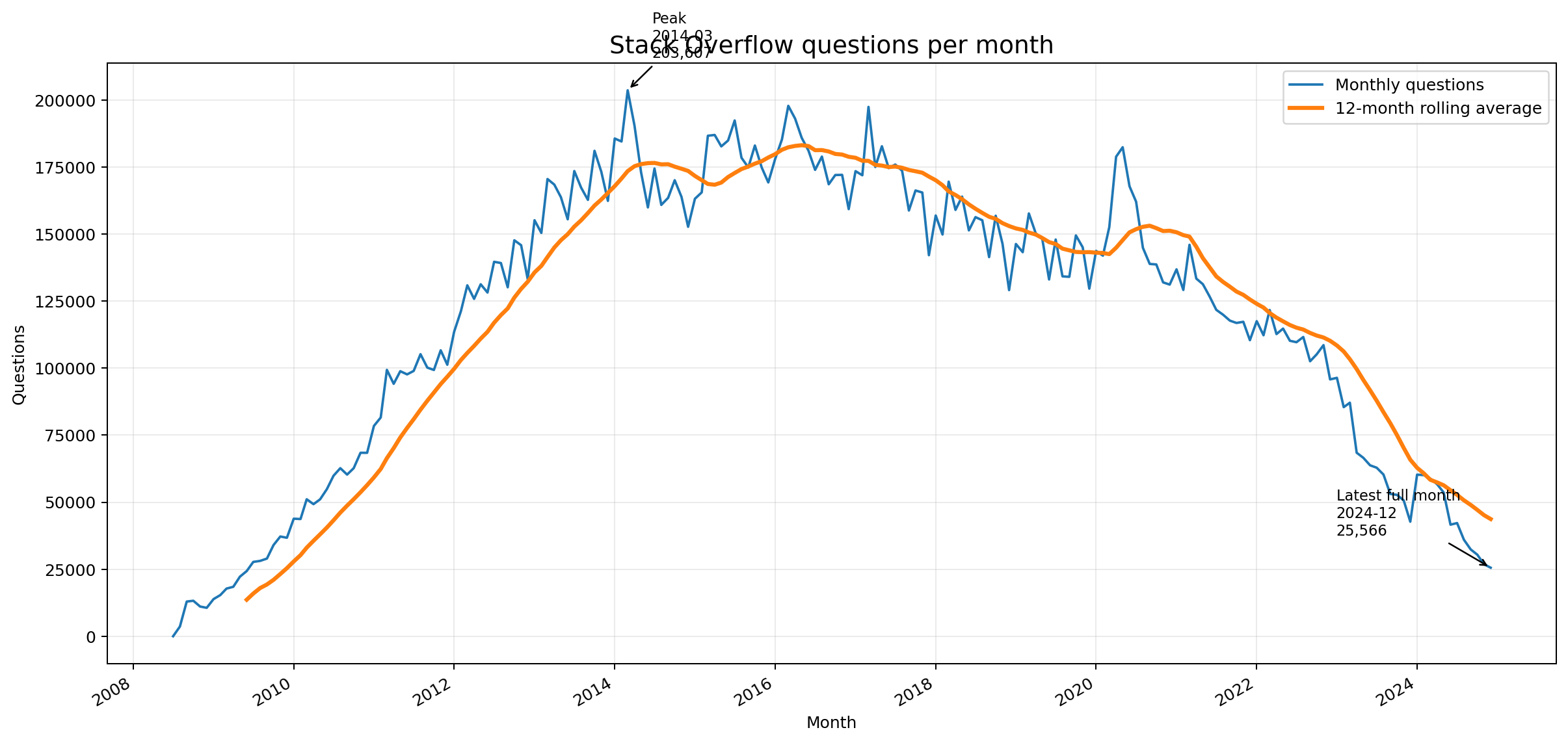
This is the number of questions posted on Stack Overflow per month, from 2008 to late 2024. The pattern is striking: a steady rise from Stack Overflow’s founding, peaking around 2014 at roughly 200,000 questions per month. Then a gradual decline – and after November 2022, when ChatGPT launched, a dramatic drop. The most recent data point shows approximately 25,000 questions per month in December 2024.
Let the data speak. This is one of the most visible signals of AI’s impact on software development. Developers are not asking fewer questions – they are asking them somewhere else.
7.2 The Challenge
Your task: recreate this plot using Python.
This means:
- Find the data – programmatically. Where does this data actually come from? The Stack Overflow Data Explorer, the Stack Exchange API, or another source? Part of the challenge is figuring out how to access the raw numbers – and ideally, writing Python code that fetches the data for you rather than downloading it manually.
- Reproduce the plot. Write a Python script that loads the data and produces a chart that resembles the image above – monthly question counts over time, with a rolling average.
- Extend it. Overlay markers for breakthrough AI events from the course’s Interactive AI Timeline. Visit the timeline, explore the milestones, and find a way to get the relevant data (event names, dates) into your Python script. You choose how the markers look: vertical lines, annotations, icons, colored regions – be creative.
Two things to notice about this challenge:
- It is surprisingly doable with generative AI. With the right prompts and a code pilot at your side, you can go from zero to a working plot faster than you might expect.
- Without guidance, you will hit real obstacles. Data access is not trivial. Parsing decisions matter. Plot formatting is fiddly. AI-generated code will get you 80% of the way and then produce subtle bugs in the last 20%. Pay attention to where that boundary falls.
7.3 Pre-Challenge Survey
Before you start coding, we will run a quick survey. You will be asked to estimate how difficult this task is and how long it will take – both for just getting a working script, and for building a full software development setup (project structure, tests, CI/CD, documentation) that a team could develop further.
The key questions:
- Difficulty rating (1 = trivial, 5 = very hard): How hard do you think this task is?
- Time estimate (script only): How long to get a working Python script that produces the plot?
- Time estimate (full SW dev cycle): How long if you also want proper project structure, tests, CI/CD, and documentation – a codebase ready for team development?
- Confidence level (1 = not confident, 5 = very confident): How confident are you that you can complete this?
Fill out the pre-challenge survey now. Hold on to these numbers. The gap between your estimates and reality is one of the most important lessons in this course.
After the challenge, you will fill out a post-challenge reflection survey so we can compare expectations to reality.
7.4 Challenge Rules and Guidance
Teams: Form groups of 2-3.
Tools: You must use a code pilot. GitHub Copilot is recommended (you set it up in the previous section), but any AI coding assistant works.
Deliverable: A GitHub repository containing:
- Python code that reproduces the Stack Overflow questions chart, including AI milestone markers based on the course’s Interactive AI Timeline
- You choose the visual style for the markers – vertical lines, colored annotations, labeled arrows, or anything else that makes the timeline readable
- A record of every prompt you used (see below)
Critical requirement: Record your prompts.
Every prompt you give to an AI tool during this challenge must be checked into the repository. This is your first AI Diary entry. For now, we are not prescribing a format – figure out what works for your team. Save prompts in a text file, a markdown document, screenshots, or whatever seems natural. The only rule is: someone reviewing your repository should be able to see what you asked the AI and in what order.
Why? Because prompts are part of the engineering process now. They are design decisions. They deserve version control just like code does.
7.5 The AI Diary – A Preview
The prompt recording requirement above is your first encounter with a concept we will formalize later in the course: the AI Diary.
An AI Diary is a systematic record of your interactions with AI during development. It captures:
- What you asked (the prompts)
- What you got (the responses, or at least whether they worked)
- What you changed (how you iterated on prompts that did not work)
- What you learned (patterns that emerged)
Why does this matter?
- Reproducibility: If your code works because of a specific prompt sequence, that sequence is part of your build process.
- Learning: Reviewing your own prompt history reveals patterns – what kinds of instructions produce good code, and what kinds lead to hallucinations or bugs.
- Team knowledge sharing: In a team setting, prompt strategies are transferable knowledge. An AI Diary makes them shareable.
- Accountability: In professional contexts, being able to show how AI-generated code was produced is increasingly important.
For this challenge, just get started. Find an approach that feels natural. We will revisit the AI Diary concept in a later lecture with concrete suggestions, templates, and tooling for doing this systematically.
8. Course Roadmap: 13 Weeks of AI-Supported Development
This course follows a four-act structure, designed so that each phase builds on the questions raised by the previous one:
ExperienceWeeks 1–2
UnderstandWeeks 3–7
MasterWeeks 8–10
GovernWeeks 11–13
Act I: Experience (Weeks 1-2) – “The Wow and the Oops”
You USE AI tools before understanding them. You experience the power and the failures firsthand. This creates the cognitive tension that motivates everything that follows. After these two weeks, you will have a personal list of “things AI got right” and “things AI got wrong” – and a burning question: why?
Act II: Understand (Weeks 3-7) – “How Does This Actually Work?”
The largest block. You learn the foundations: tokenization, embeddings, the attention mechanism, context windows, inference. Then you learn to control AI output through prompting strategies and structured output generation. This is the durable knowledge that survives tool changes. Tools will come and go; understanding how they work will remain valuable.
Act III: Master (Weeks 8-10) – “Wielding It Professionally”
You learn to evaluate AI output rigorously (not just “it runs”), integrate AI into real development workflows (IDE assistants, CI/CD, code review), experiment with agentic pipelines, and measure productivity impact with data rather than anecdotes.
Act IV: Govern (Weeks 11-13) – “The Bigger Picture”
You confront risks (security vulnerabilities in AI-generated code, prompt injection, data privacy), organizational impact (cost, compliance, training), and the economics of AI adoption. The course ends with you defending your own AI integration strategy – a skill that will be valuable the moment you enter the job market.
Remember Alex from the opening? By Week 13, you will not only be able to use AI tools like Alex did – you will know why the hallucinated method happened (Week 3: tokenization and probability), how to write tests that actually test something (Week 7: quality evaluation), why the date bug slipped through (Week 5: prompting for edge cases), and how to build a workflow that catches these issues before they reach production (Week 8: AI in professional workflows).
9. Summary
Here is what we covered today:
-
AI coding tools did not appear from nowhere. They are the product of a decade-long deep learning revolution that started with AlexNet (2012), accelerated with the Transformer architecture (2017), and reached consumers with ChatGPT (November 2022).
-
The pace of change is unprecedented. From ChatGPT to autonomous AI agents took less than three years. New models, capabilities, and tools appear monthly. The interaction paradigm has shifted from copy-paste in a browser to AI agents that read, write, test, and deploy code in your environment.
-
The industry impact is real and measurable. StackOverflow traffic dropped ~50%. GitHub reports 46% of new code is AI-assisted. 76% of developers use or plan to use AI coding tools. But trust in AI accuracy (43%) lags far behind perceived productivity gains (70%) – and that gap is where this course lives.
-
The provider landscape is complex and competitive. OpenAI, Anthropic, Google, Meta, DeepSeek, Mistral, and others each have different strengths, pricing models, and privacy implications. This complexity is exactly why systematic evaluation methodology matters.
-
This course uses VS Code + GitHub Copilot because it is free for students, well-integrated, industry-standard, and increasingly model-agnostic. But you will also work with other tools and APIs to build broad competence.
-
Your first challenge puts this into practice immediately. Recreating the Stack Overflow questions chart with AI tools is a real task with real obstacles – data access, code generation, debugging. Recording your prompts in an AI Diary is your first step toward treating AI interactions as engineering artifacts, not throwaway conversations.
-
The goal is not to make you dependent on AI. It is to make you an AI-literate engineer who can critically evaluate, effectively use, and strategically deploy these tools. The developers who thrive will not be those who blindly accept AI output or those who refuse to use AI at all – they will be those who understand the technology deeply enough to know when to trust it and when to question it.
Next week, we analyze the results of the Stack Overflow Challenge. Which prompts produced working code on the first try? Where did the AI stumble? How did your time estimates compare to reality? The patterns of success and failure from this challenge begin the journey from experience to understanding.
10. Further Reading
Foundational Papers:
- Krizhevsky, Sutskever, Hinton. “ImageNet Classification with Deep Convolutional Neural Networks” (NeurIPS 2012) – The AlexNet paper that started it all.
- Vaswani et al. “Attention Is All You Need” (NeurIPS 2017) – The transformer paper. We will study this in detail in Weeks 3-4.
- Brown et al. “Language Models are Few-Shot Learners” (NeurIPS 2020) – The GPT-3 paper demonstrating emergent abilities.
- Chen et al. “Evaluating Large Language Models Trained on Code” (2021) – The Codex paper that led to GitHub Copilot.
Industry Reports and Surveys:
- Stack Overflow Developer Survey 2024 (AI sections) – How developers actually use AI tools.
- GitHub. “The State of AI in Software Development” (2024) – Copilot adoption data and productivity claims.
- Peng et al. “The Impact of AI on Developer Productivity: Evidence from GitHub Copilot” (2023) – The 55% productivity claim we will scrutinize in Week 10.
Tools and Protocols:
- GitHub Copilot documentation – Getting started, features, best practices.
- Anthropic Model Context Protocol (MCP) specification – The open standard for AI-tool connectivity.
- VS Code documentation – Extensions, settings, keyboard shortcuts.
Historical Context:
- Jay Alammar. “The Illustrated Transformer” (jalammar.github.io) – The best visual explanation of transformers, recommended preparation for Weeks 3-4.
- The AlexNet moment and its impact: “Deep Learning” by Goodfellow, Bengio, and Courville (MIT Press, 2016) – Chapter 1 for historical context.